October 12, 2026
The Physics Behind the Screen
hardware · AI hardware · how computers work · systems
I was presenting a prototype. On the screen: a system that looked effortless — data in, answers out, clean interface, no visible machinery. The room was engaged. Then, at the end, I showed them the chip.
Not a render. Not a diagram. The actual custom silicon the whole demo had been running on, sitting on a board, its little status lights blinking. People leaned in like I had just revealed a magic trick. One of them said — half joking, half serious — “wait, this was in there the whole time?”
It was. The whole time, a few centimeters from the coffee cups on the table.
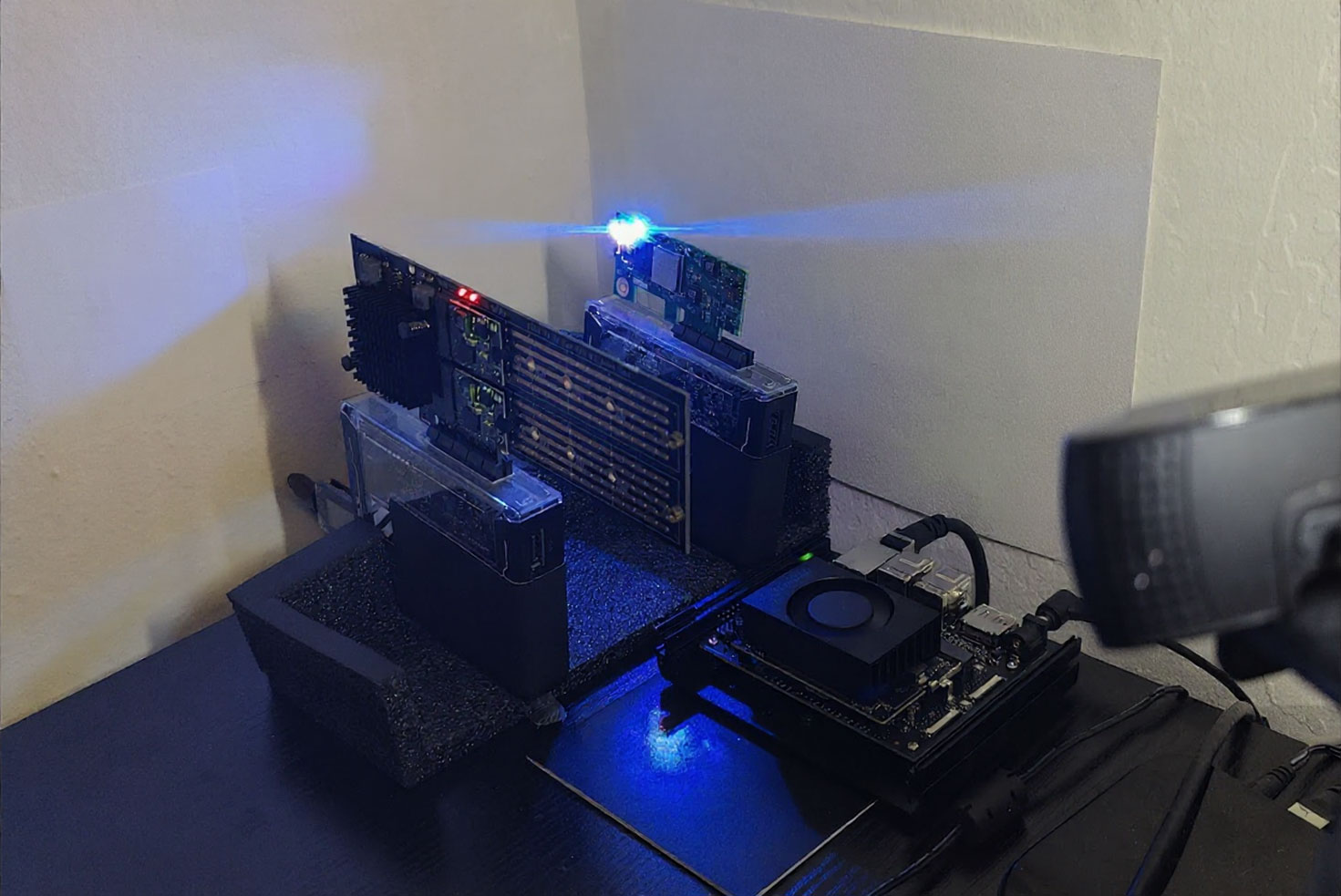
That reaction is not ignorance. It is the most successful design achievement of the last fifty years: we made hardware invisible on purpose. And I think that invisibility has consequences — in how we build things, how we pay for them, and how surprised we are when the real world pushes back.
Why nobody pictures the hardware
Every part of modern computing is built to hide the part below it. That is not a flaw — it is the point. Your phone hides the machine. The cloud hides a data center the size of a stadium. Every layer whispers: don’t worry about what is under me.
And it works. I write software that treats a planet-sized network like a single button. You tap your phone and something smart answers. Nobody thinks about the electricity, because nobody should have to.
But our brains take the metaphor literally. If the screen never shows the machine, the machine stops existing in our heads. I have watched smart people plan projects as if speed were free and storage were infinite — because inside their screen, it is.
One tap, seven layers
Let me turn the lights on. You tap a button; a number appears. Here is what actually happens in between — in plain words:
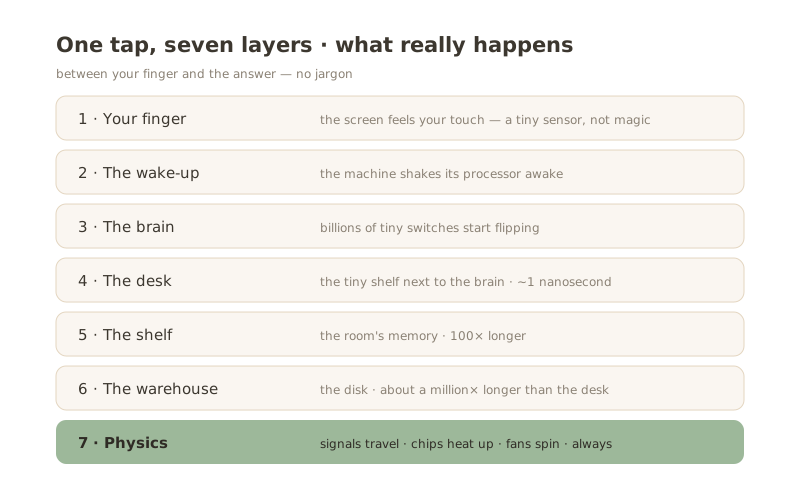
- Your finger. The screen feels your touch. A tiny sensor, not magic.
- The wake-up. The machine shakes its processor awake. (Engineers call this an “interrupt.” Think of it as tapping the machine on the shoulder.)
- The brain. Billions of tiny switches start flipping to do the work. Yes — billions.
- The desk. The processor keeps the things it uses most on a tiny shelf right next to itself. Fetching something from the desk takes about one nanosecond.
- The shelf. If it is not on the desk, it is usually in the room — the computer’s main memory. This trip is a hundred times longer.
- The warehouse. If it is not in the room either, someone has to walk to the warehouse — the disk. This trip is about a million times longer than the desk. Go make coffee.
- Physics. Meanwhile: signals travel, chips heat up, fans spin. Always.
To feel those distances: light — the fastest thing in the universe — travels about 30 centimeters in one nanosecond. If a “desk” lookup felt like one second, a trip to the warehouse would take about two months.
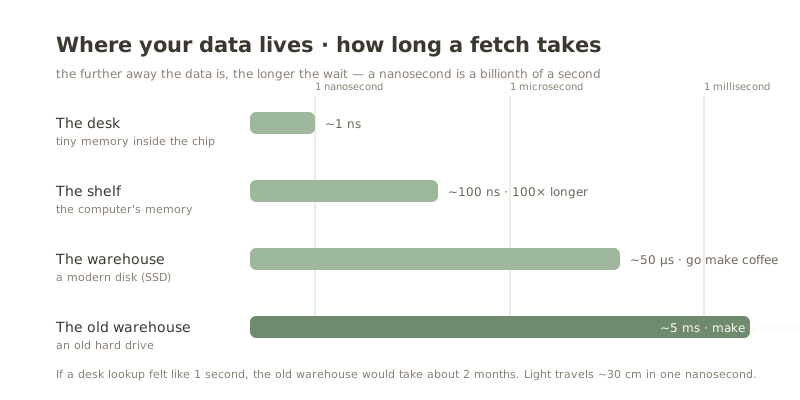
That is why every computer is built around one desperate idea: keep the data on the desk. All the clever machinery inside your devices exists because moving data is slow, and physics charges rent.
The limit of a fast-running application is drawn by hardware. Not by the programming language. Not by the framework. By the machine underneath.
Physics does not negotiate
Go one layer deeper and things get wonderfully physical.
A human hair is about 80,000 nanometers wide. The tiny switches inside a modern chip are tens of thousands of times thinner than that — you could line up thousands of them across a single hair. Each one flips billions of times a second, and every flip makes a tiny bit of heat.
Heat is where the dream ends. A chip does not care about your deadline; it has a temperature limit. Around 2005, chips hit the heat wall — flipping switches faster started melting things. Since then, computers got better by getting wider: many small brains instead of one big one. Speed stopped being free.
The free lunch is over — and AI made hardware famous again
For decades, programmers had a free lunch: buy a new computer, and yesterday’s code runs faster tomorrow. Nobody had to do anything. That era ended with the heat wall. Now speed has to be earned — by keeping data close, by doing many things at once.
Then AI arrived, and hardware became the star of the show. A big AI model does not care how clever your code is. It cares about how fast you can feed it. One of today’s AI chips — NVIDIA’s Blackwell B200 — carries over 200 billion switches, moves data at roughly 8 terabytes per second, and drinks up to 1,000 watts: about as much as a microwave and a space heater running together. Those are not software numbers. Those are the numbers of a machine that needs a plug, a cooler, and a room.
(I wrote about how to separate the marketing from the reality in Low-Power AI Accelerators: From FPGA to ASIC.)
And it is not just AI labs. Look at Microsoft: with memory prices spiking, the company that met every slowdown with “just buy more RAM” is now re-engineering Windows itself to run well on 8 GB PCs — reworking the memory manager, squeezing the background noise, chasing early gains of up to about 3 GB. The world’s biggest software company is rewriting its oldest product because the hardware got scarce. When even Microsoft starts optimizing around the hardware, you know the hardware is back in charge.
This is why hardware became interesting again — and why I moved from infrastructure into AI hardware. When a model takes two seconds to answer, the reason is almost never “the algorithm is slow.” It is data living far from the desk, or a machine too hot to go faster. The screen shows a spinner; the truth is physical.
So we started streaming the chip
After that first demo, we changed how we present. Now, next to the screen, we run a small live video feed of the actual board — the chip working, lights blinking, the physical thing being physical. It is a small trick, but it works. People stop treating software as weightless. They ask better questions. They understand why “just make it faster” is an engineering problem, not a button.
This post is the text version of that video feed. Everything you do on a screen runs on something like the photo above — boards, silicon, heat, and billions of quiet switches. The layer under the interface is not mysterious.
It is just invisible. Until someone turns on the lights.
FAQ
Do software teams really need to think about hardware? Not every day — but at every ceiling. When something feels “slow,” the answer is usually physical: where the data lives, how fast it can move, or how hot the machine is.
Why did computers stop getting faster every year? Heat. Around 2005, making switches flip faster began to melt chips. Since then progress came from adding more small brains instead of one fast one — and more recently, from special-purpose hardware like AI accelerators.
Why does AI need special hardware? Because a large model spends its time moving data, not thinking. Special chips put the memory right next to the work and move hundreds of gigabytes per second — that is the whole trick.
What is a transistor? The tiniest switch in the story. Everything on your screen right now is a few billion of these switches, flipping on and off. Smaller than anything you can see, and very much real.